Chocolate Pi


Current version: v2026.10.01 – see CHANGELOG.md for
what that includes, and its “Versioning” section for how each
expansion tracks its own version independently.
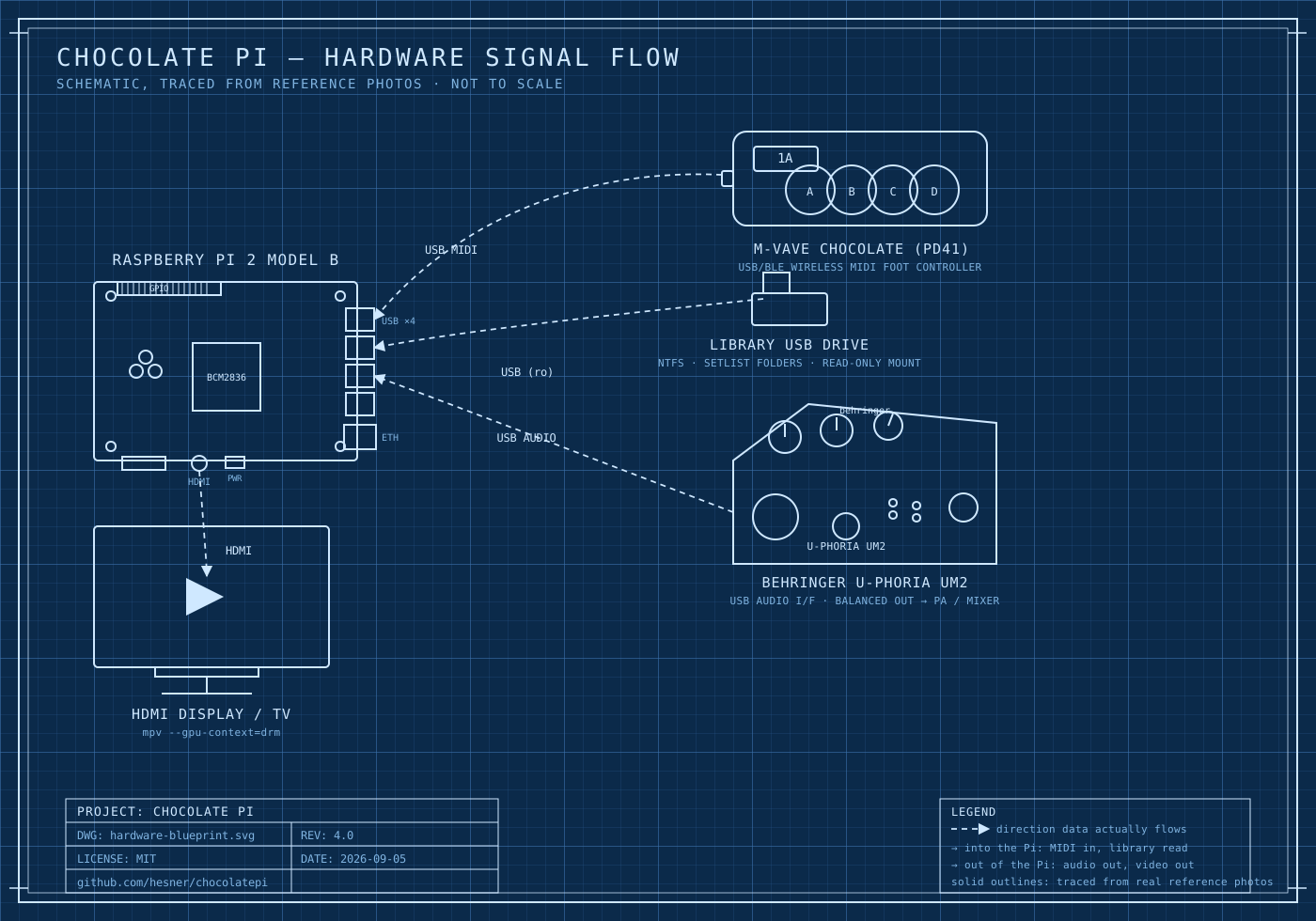
A Raspberry Pi–based MIDI footswitch controller for triggering audio and video live on stage. Built for the band NO FUTURO, designed to work with any standard MIDI controller — not tied to one specific pedal brand.
Press a footswitch, a song or video clip plays. Press another, it stops and the next one starts. A dedicated STOP is always one press away, instantly, no matter what’s playing. When nothing is selected, a standby video loops on screen. No screen or keyboard needed once it’s set up — plug in power and it’s ready.
Why this exists
Most “MIDI footswitch → trigger backing tracks” setups either lock a band into one specific brand of pedal, or require a laptop on stage. This project is a small dedicated appliance instead: a Raspberry Pi that boots straight into show mode, reads standard MIDI Program Change messages from whatever controller is plugged in, and plays whatever’s mapped to each button — audio-only tracks (MP3/WAV) or full video clips with embedded audio (MP4/MOV/MPEG).
How it’s built
Four independent layers, so the parts that know about a specific MIDI controller never leak into the parts that know about playback:
MIDI CONTROLLER  →  Adapter  →  Mapper  →  Core
 (any brand)        (device-      (MIDI →     (audio/video
                     specific)     abstract     playback,
                                   actions)      library, standby)
- Adapter (
src/adapter/) — the only layer allowed to know about a specific controller’s quirks. Currently validated against an M-VAVE PD41; swapping in a different controller only touches this layer. - Mapper (
src/mapper/) — translates standard MIDI Program Change into abstract actions (SelectTrack,Stop). Works with any controller that sends standard Program Change, regardless of brand. - Core (
src/core/) — owns actual playback: resolves a selection against a library on a USB drive, drivesmpvfor video (with a standby loop and a dedicated audio-only lane for standalone tracks), and always prioritizes audio over video if the two ever have to trade off.
The full architecture rationale, every approved decision, and the
evidence behind each one live in MASTER_SPECIFICATION.md
— the project’s actual contract, not just a summary.
Status
Actively used and tested against real hardware: a Raspberry Pi 2, a
Behringer U-PHORIA UM2 USB audio interface, an M-VAVE PD41 MIDI
controller, and a library USB drive. See TESTING.md for what’s been
validated (audio/video sync, real-TV frame timing, power-loss safety)
and MAVAVE_ANALYSIS.md for the empirical MIDI
controller analysis behind the current mapping.
Getting started
Hardware: a Raspberry Pi (developed against a Pi 2, Raspberry Pi OS
Lite), a USB audio interface, a MIDI foot controller that can send
standard Program Change, a USB drive for the song/video library, and a
5V/2.5A-minimum power supply – an underpowered one causes real
freezes under load (see TESTING.md), not just a warning.
Software: python3 (standard library only – no third-party Python
packages, nothing to pip install), plus mpv, ffmpeg, and ntfs-3g
on the Pi itself (sudo apt install -y mpv ffmpeg ntfs-3g).
git clone https://github.com/hesner/chocolatepi
cd chocolatepi
python3 -m unittest discover -s tests -v   # no hardware needed for this part
The full step-by-step install – library USB, the systemd service for
automatic boot, and the read-only root filesystem – is in
systemd/README.md, starting from prerequisites
through to a locked-down appliance (it also has a chapter reviewing
whether a non-programmer can actually follow it end to end). Once it’s
running, see LIBRARY.md before organizing songs/videos
on the library USB – one easy-to-make filename mistake there fails
completely silently. Something not behaving as documented? Check
TROUBLESHOOTING.md first. Setting this up on new
hardware from scratch (including with an AI coding agent doing the
work) – see REBUILD.md.
Optional expansions
The pedal above works standalone – nothing below is required. For
managing the library USB from a phone’s browser instead of SSH, see
expansions/: self-contained, independently
installable/removable addons that never modify the base pedal system,
and can be fully uninstalled back to it at any time.
| Expansion | What it does | Status | Version |
|---|---|---|---|
setlist-admin-usb |
Manage Sets/Banks/tracks from a phone’s browser, reachable by plugging the phone into the Pi over USB (Android tethering / iPhone Personal Hotspot over cable), no WiFi hardware required | Implemented and validated end-to-end on real hardware | v2026.10.01 |
setlist-admin-wifi |
The same library management, plus Pi WiFi configuration, reachable over WiFi | On the roadmap, not planned for near-term development (2026-10-03) – implemented and unit-tested, a working WiFi dongle was found, but real-hardware validation and further work are deliberately deferred. See its own SPECIFICATION.md |
v2026.10.01 |
See expansions/README.md for the full model
(each expansion’s own installer/rollback script, the independence
rules between them).
Project layout
src/
├── adapter/            MIDI controller–specific translation
├── mapper/             Standard MIDI → abstract actions
├── core/               Playback, library, standby
├── main.py             Real runtime entry point
├── live_test.py        Manual hardware check: prints what the Adapter/Mapper
│                       would do for each MIDI message, without touching playback
└── core_smoke_test.py  Manual hardware check: exercises Player/AudioPlayer
                        directly (video+audio, standby), without the MIDI layer

tests/          Unit tests (no hardware required)
systemd/        Auto-boot service, udev/fstab notes
scripts/        One-off setup scripts (e.g. the fallback standby video)
expansions/     Optional addons (see "Optional expansions" above)
docs/es/        Spanish translations of the project documentation
Contributing
Issues and pull requests are welcome – see CONTRIBUTING.md
for the guidelines, and CHANGELOG.md for release history.
If you’re adapting this for a different MIDI controller, the Adapter
layer (src/adapter/) is where that work belongs — the Mapper and
Core shouldn’t need to change.
Support this project
If this project is useful to you, consider sponsoring it on GitHub.
License
MIT — use it, modify it, ship it commercially, no strings attached.
Credits
Architecture, specification, and hardware validation by Hesner Duran for NO FUTURO. Implementation built with Claude Code.